iThenticate Plagiarism Check Integration
iThenticate is a professional similarity-checking service widely used in scholarly publishing. Many publishers also know this workflow as Crossref Similarity Check, because eligible Crossref members can access iThenticate through Crossref's Similarity Check service.
iThenticate compares a submitted manuscript against large collections of published literature, web content, and other indexed sources, then returns a similarity score and an online report for editorial review.
For journals and publishers, similarity checking is usually part of the technical pre-check stage before peer review. It helps editors identify possible text overlap, missing quotation marks, duplicate submission risk, or other issues that should be reviewed before the manuscript moves forward.
Why Integrate iThenticate with Academic Stack?
Many publishers manage multiple journals, editors, and manuscript workflows at the same time. If all editors need to share a single iThenticate account manually, the process can quickly become inconvenient:
- different editors may handle different manuscripts
- files must be downloaded and uploaded manually
- report links and similarity scores may be tracked outside the manuscript record
- account sharing can become difficult to coordinate
Academic Stack provides a direct API integration that allows editors to submit manuscript files to iThenticate from inside the article handling page. The platform supports both iThenticate v1 and iThenticate v2, so publishers can connect the version used by their iThenticate account.
Eligible Crossref members can use iThenticate through the Crossref Similarity Check service, which is the name many editorial teams are more familiar with. This can significantly reduce checking costs compared with purchasing iThenticate independently.
To use this route, the publisher must provide Crossref with article full-text links as required by the Similarity Check program.
How the Integration Works
Academic Stack connects the manuscript record, uploaded files, iThenticate submission, similarity result, and report link in one place.
The typical workflow is:
- The editor opens the manuscript handling page.
- The editor chooses a manuscript file and submits it to iThenticate.
- Academic Stack sends the file to iThenticate in the background.
- iThenticate processes the file asynchronously.
- Academic Stack updates the check status when the result is available.
- The editor reviews the similarity score and opens the report link.
Submit a File to iThenticate
Open the manuscript handling page in the editorial process. In the iThenticate Reports section, click Submit New File to iThenticate.
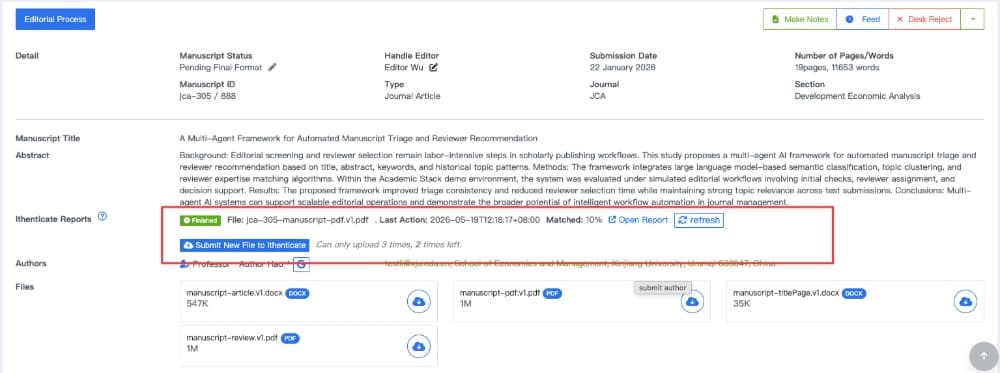
Figure 1: Accessing the iThenticate Reports section within the manuscript handling page
A file selection window will open. Select the manuscript file you want to check, then click Upload to iThenticate.
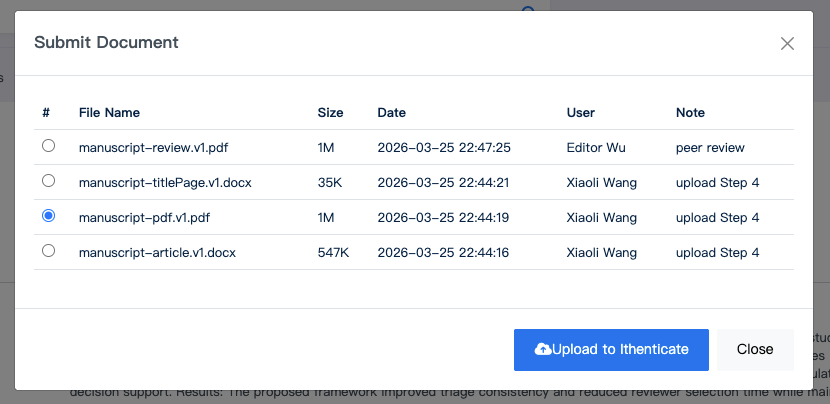
Figure 2: Selecting and uploading a specific manuscript file for similarity checking
Academic Stack will submit the selected file to iThenticate asynchronously. You can continue working while the system waits for the iThenticate result.
View the Similarity Result
After iThenticate finishes processing the file, the report status in Academic Stack will update automatically. The report area can display:
- the submitted file name
- the latest action time
- the matched similarity percentage
- the report status
- a report link
- a refresh button
Click Open Report to view the iThenticate similarity report.
iThenticate report links may expire after a short time. If a report link no longer works, click refresh in Academic Stack to request a new report link.
Recommended Editorial Use
Similarity scores should be reviewed by an editor, not treated as an automatic decision. A high score may be acceptable when overlap comes from references, methods, author names, preprints, or properly quoted text. A low score does not automatically guarantee that the manuscript has no originality issues.
Use iThenticate as part of a broader editorial pre-check process, together with scope review, formatting checks, ethical declarations, and journal policy requirements.
Summary
The Academic Stack iThenticate integration helps publishers centralize similarity checking inside the manuscript workflow. Editors can submit files directly from the manuscript record, track status asynchronously, and access similarity reports without sharing one account manually or moving report data outside the system.