Crossref DOI Registration
This guide explains how Academic Stack helps publishers register article DOIs with Crossref, either directly from the article list or by downloading and manually uploading Crossref XML.
What Is a DOI?
A DOI (Digital Object Identifier) is a persistent identifier for scholarly content. It resolves through https://doi.org/ and redirects readers to the current landing page for an article, book chapter, conference paper, dataset, or other scholarly record.
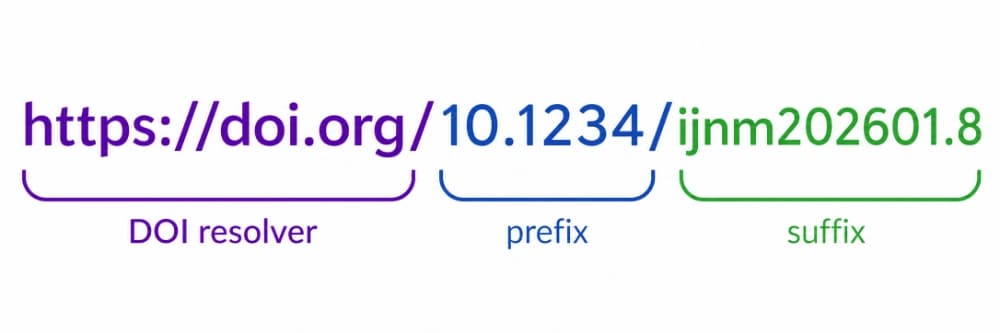
Figure 2: Anatomy of a DOI showing the resolver URL, assigned prefix, and publisher suffix
For journal publishers, a DOI consists of two primary components:
{DOI Prefix}/{DOI Suffix}
- DOI Prefix: Assigned exclusively by the registration agency (e.g., Crossref).
- DOI Suffix: Created and defined by the publisher. It must be unique within that prefix.
Crossref is the DOI registration agency recommended for journal and conference publishing workflows in Academic Stack. Crossref supports scholarly metadata deposits, reference linking, DOI resolution, and downstream metadata discovery by indexing services. During Crossref membership application, you can select Academic Stack from Crossref's platform/service-provider list.
Academic Stack recommends a consistent, predictable DOI suffix pattern:
{doi_prefix}/{journal_slug}{year}{issue_number}.{article_number}
Example: 10.66128/jci202601.5
We strongly recommend establishing a stable suffix pattern for the entire journal. Because DOIs are persistent identifiers, once a DOI is registered, the string itself cannot and should not be changed.
If the journal has not received its ISSN yet, wait until the ISSN is active and available before applying for and registering DOIs.
Before You Start
Before attempting to register DOIs from Academic Stack, please ensure that you have fulfilled all the prerequisites:
- Crossref Membership: Your publisher or journal has completed the Crossref membership setup.
- DOI Prefix: Crossref has assigned a unique DOI prefix to your account.
- ISSN: The journal has a valid ISSN.
- System Credentials: Academic Stack is configured with your Crossref username, role, and password.
- Metadata Readiness: The article metadata is complete (including Title, Authors, Publication Date, Article URL, Journal Title, Volume, Issue, and DOI Suffix).
Academic Stack transmits Crossref metadata through Crossref's XML deposit workflow using HTTPS POST. This allows the system to generate a Crossref-compliant XML deposit and submit it directly from the article management interface.
Registration Methods
Choose the registration method that best fits your workflow:
Method A: Direct One-Click Deposit
This is the most common and efficient method. You can submit or update the DOI metadata directly from the Academic Stack dashboard.
Step-by-Step Instructions:
-
Access the Article List: Navigate to the article list in the editorial panel. For any published article, the DOI will be displayed above the article title.
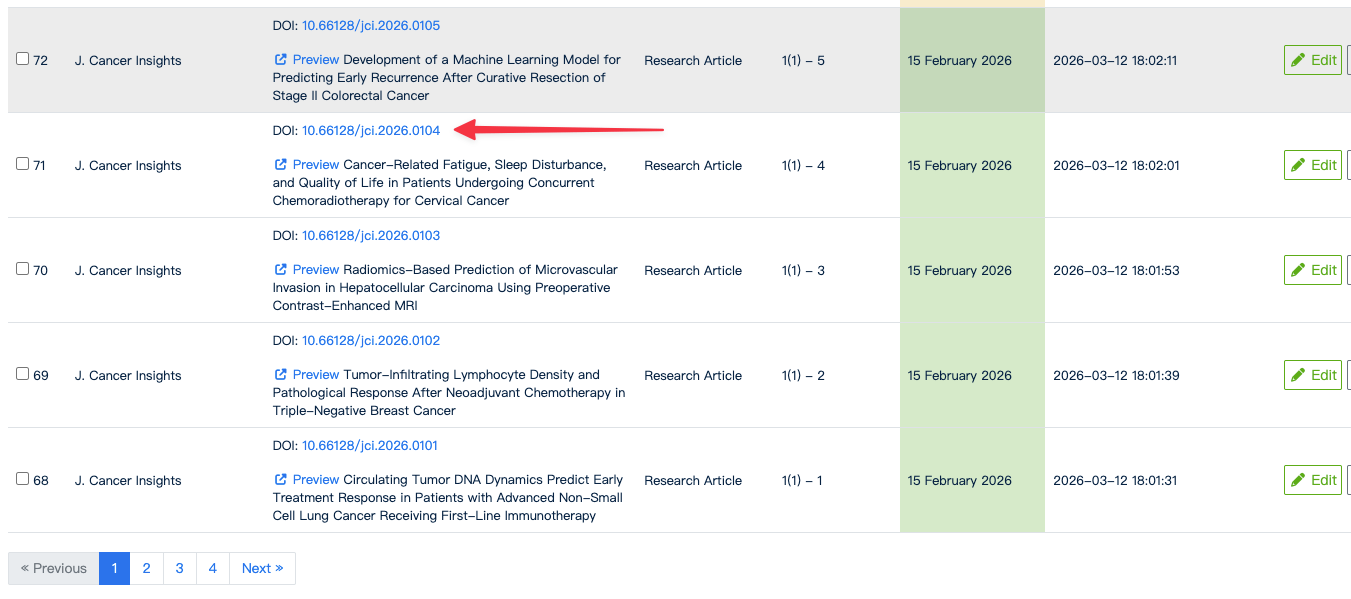
Figure 3: Accessing the DOI registration modal via the article list view
-
Open the Registration Panel: Click the active DOI link to open the DOI registration window.
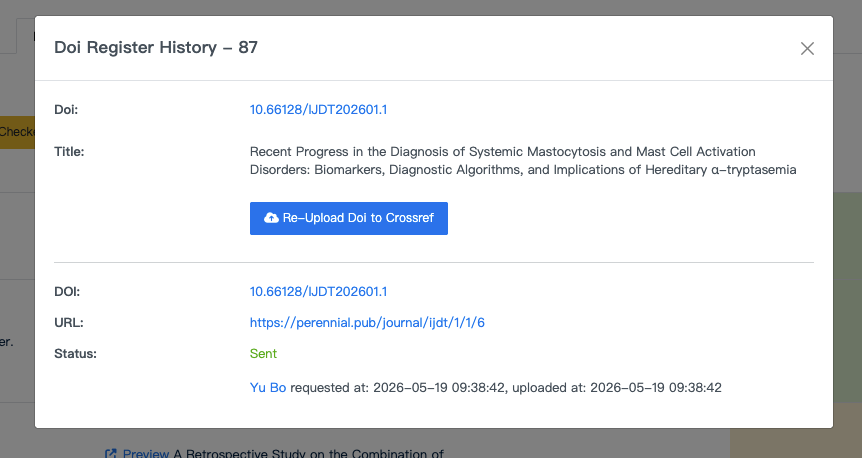
Figure 4: Submission history and deposit control panel in Academic Stack
-
Submit to Crossref:
- In the registration window, review the article's DOI and title metadata.
- Click Upload DOI to Crossref to initiate direct transmission.
- If you have updated the metadata of a previously registered article, click Re-Upload DOI to Crossref. Crossref accepts updates by overwriting the existing metadata record.
-
Confirm Submission: After the request is sent, Academic Stack logs the deposit history and updates the status. A successful status locally means the XML payload has been accepted by the Crossref gateway. It will then enter the Crossref processing queue.
Method B: Manual XML Upload
Use this method if you need to review, customize, or manually dispatch metadata payloads, or when managing complex metadata submissions.
Step-by-Step Instructions:
-
Export the XML Payload: From the article list, select one or more articles. Open the checked-items batch action menu and click Download Crossref XML.
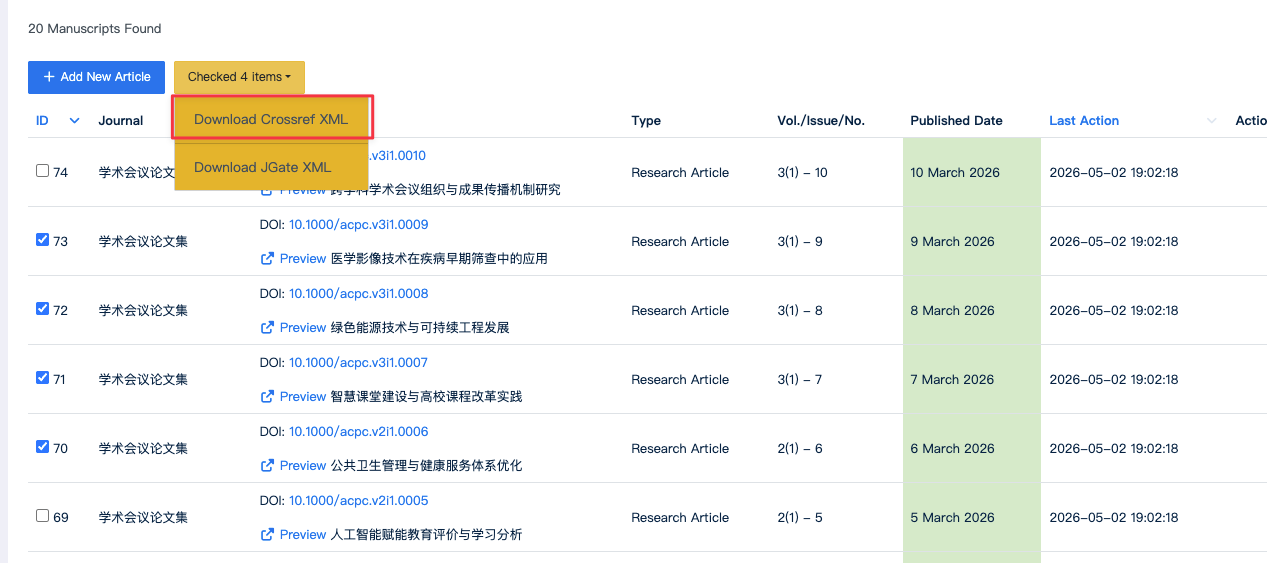
Figure 5: Generating and downloading Crossref-compliant XML metadata in bulk
-
Upload to Crossref Portal:
- Log in to the Crossref Admin Tool.
- Go to Submissions > Upload.
- Choose the downloaded XML file, ensure the file type is set to Metadata, and click upload.
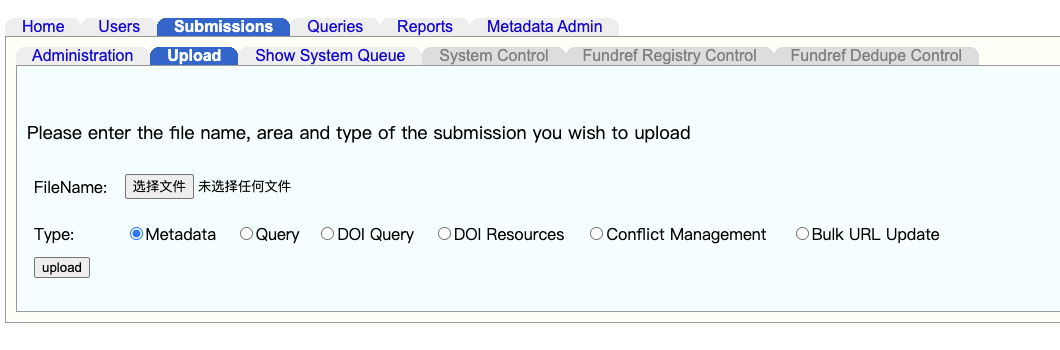
Figure 6: Manual XML file submission interface on doi.crossref.org
-
Verify Processing: Return to the Submissions tab to confirm that Crossref has processed the XML file without warnings or validation failures.
The generated XML file is structured in accordance with strict NISO/Crossref schema definitions. It serves as an excellent standardized format and can often be reused or adapted for other indexing repositories or institutional archives.
Verifying Status and Troubleshooting
Crossref's deposit API may accept a direct POST submission but report validation or parsing failures during asynchronous queuing. To ensure that your DOIs are registered successfully, you should verify the processing reports:
- Log in to the Crossref Admin Portal.
- Go to the Submissions tab.
- Locate your recent submission ID.
- Click on the submission ID to open the detailed diagnostic report.
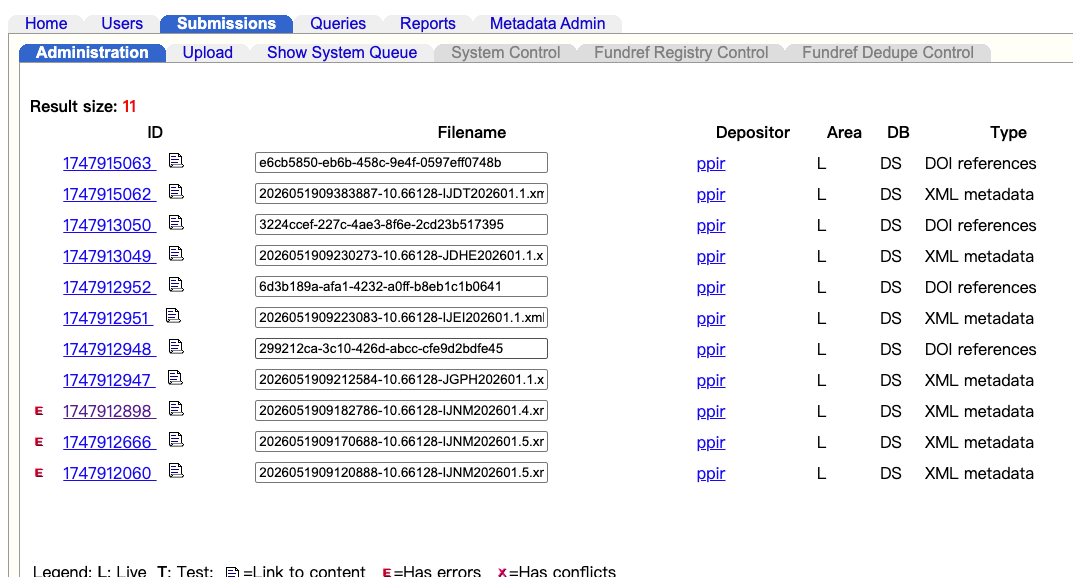
Figure 7: Tracking real-time XML processing and identifying failure logs on Crossref
Common Deposit Issues and Resolutions
If a row is marked with an error indicator, consult the diagnostic log. The table below details the most common validation errors and how to fix them:
| Error Symptom / Code | Root Cause | Resolution Action in Academic Stack |
|---|---|---|
| Missing or invalid ISSN | The journal does not have an ISSN configured or matches a placeholder. | Wait for official ISSN approval and update in Journal Settings. |
| Missing required metadata | Article title, abstract, authors, or publication dates are empty. | Edit the article details, ensure all mandatory fields are completed. |
| Invalid publication date | Date field contains invalid format (e.g. non-ISO format). | Use the date picker to set a standardized, valid publication date. |
| Duplicate DOI Suffix | The suffix is already registered for another article. | Verify the DOI suffix pattern and ensure uniqueness in article details. |
| Broken Landing Page URL | The registered article URL is private or returns a 404/500 error. | Ensure the article is set to "Published" status and public access is functional. |
| Incomplete Author Data | Missing given names, surnames, or institutional affiliations. | Complete all author records under the "Authors & Affiliations" tab. |
After resolving the errors in Academic Stack, select Re-Upload DOI to Crossref or download a corrected XML file to re-submit.
Summary
Academic Stack provides two highly robust registration paths:
- One-Click direct integration for standard publishing workflows where speed is paramount.
- Manual XML payload generation for customized setups, bulk archiving, or advanced overrides.
For optimal operations, establish a strict metadata quality control process prior to publishing articles, guaranteeing seamless DOI registration every time.