RePEc Integration
RePEc, or Research Papers in Economics, is a decentralized bibliographic database for economics and related disciplines. It helps working papers, journal articles, books, chapters, and software components become discoverable through services such as IDEAS and EconPapers.
Academic Stack can generate and expose RePEc metadata files for eligible journals, so publishers can connect their journal content to the RePEc ecosystem with a stable archive URL.
RePEc integration is generally recommended for journals in economics and related areas. If your journal is outside this scope, confirm whether RePEc is the right indexing channel before enabling it.
How RePEc Integration Works
RePEc uses an archive-based model. A publisher first obtains an archive code from RePEc, then provides a public archive URL where RePEc can harvest metadata files.
In Academic Stack, the configuration usually includes:
- Archive Code: the RePEc archive identifier assigned to your publisher or journal.
- Maintainer Name: the person responsible for the archive metadata.
- Maintainer Email: the contact email for archive maintenance.
- Editor Name: the journal editor contact shown in RePEc metadata.
- Editor Email: the journal editor contact email.
- Active URL: the public RePEc archive URL generated by Academic Stack.
Before You Start
Before configuring Academic Stack, follow the official RePEc archive step-by-step tutorial and obtain your RePEc archive code.
You should also make sure:
- The journal is related to economics or a compatible field.
- The journal articles have complete metadata.
- The journal website is publicly accessible.
- You know whether your Academic Stack deployment is PaaS/SaaS or Enterprise.
Configuration by Deployment Type
The setup process varies slightly depending on whether you are using the Academic Stack Enterprise or PaaS/SaaS version. Select your platform type below:
- Enterprise Version
- PaaS Version
In the Enterprise version, RePEc configuration may be managed at two levels: Publisher and Journal. This is useful when a publisher hosts multiple journals and only some of them should be included in RePEc.
1. Publisher-Level Configuration
Open Website Settings and locate the RePEc configuration block. Enter the publisher-level archive code and maintainer information, then save the settings.
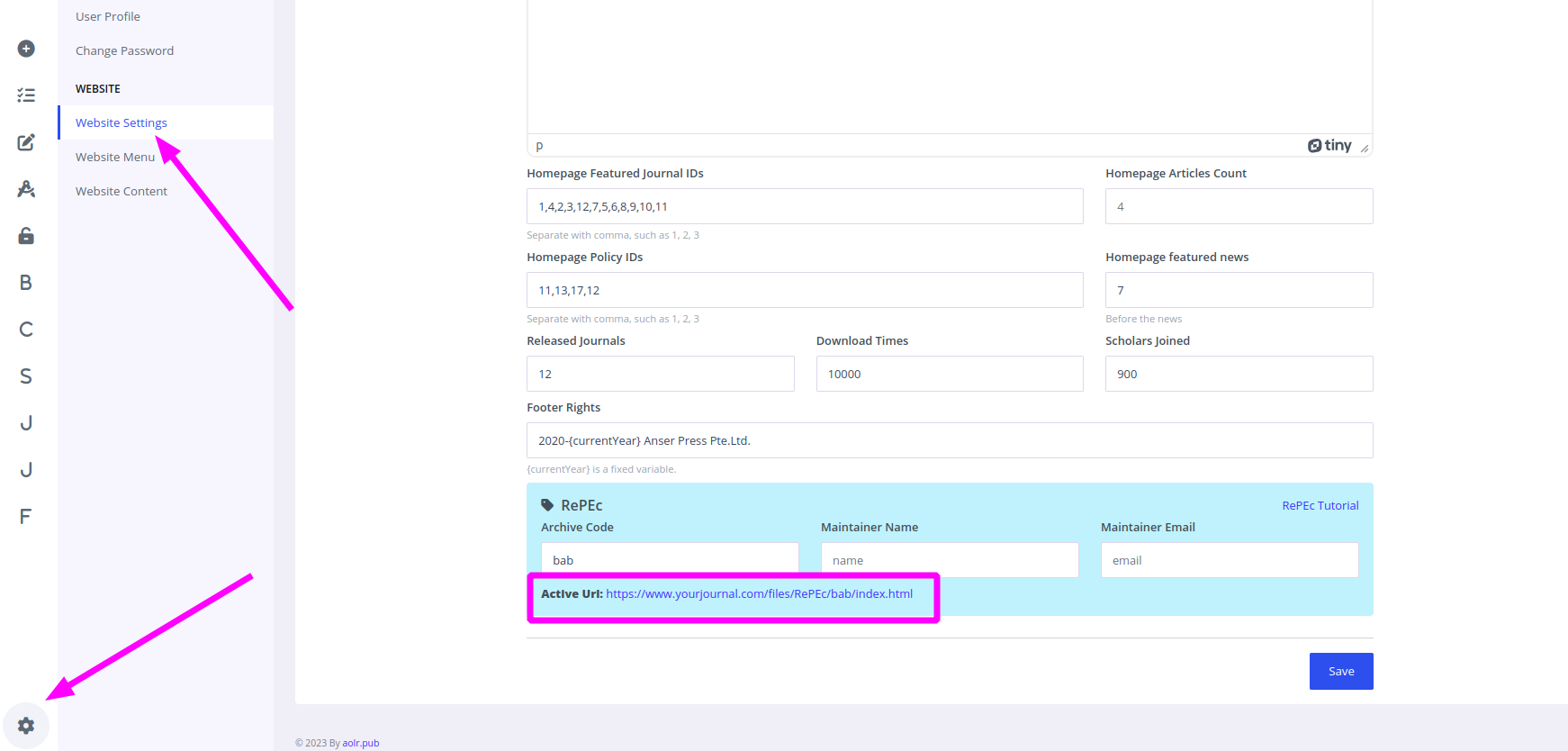
Figure 1: Entering global RePEc archive settings at the publisher level
The generated Active URL can be used as the archive URL when registering or updating the RePEc archive.
2. Journal-Level Configuration
For each eligible journal, open Admin - Journal Management > Configurations and find the RePEc block.
Enable RePEc only for the journals that should be harvested by RePEc. In most cases, only journals in economics or closely related fields should be included.
Once enabled, complete the editor information:
- Editor Name
- Editor Email
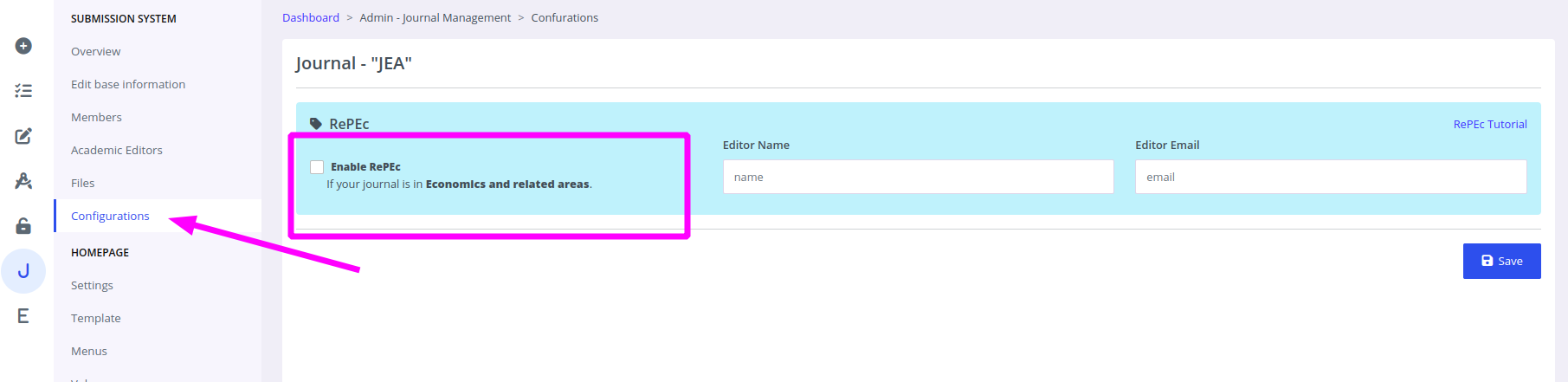
Figure 2: Enabling and configuring editor details for specific journals
When RePEc is enabled for a journal, Academic Stack includes that journal's metadata in the generated RePEc archive files.
In the PaaS version, RePEc is configured directly under the current journal. Unlike the Enterprise version, there is no separate publisher-level configuration. All RePEc information is entered in the current journal's configuration page.
Open Admin - Journal Management > Configurations and find the RePEc configuration block. Enable RePEc, then enter the archive code, maintainer information, and editor information for the current journal.
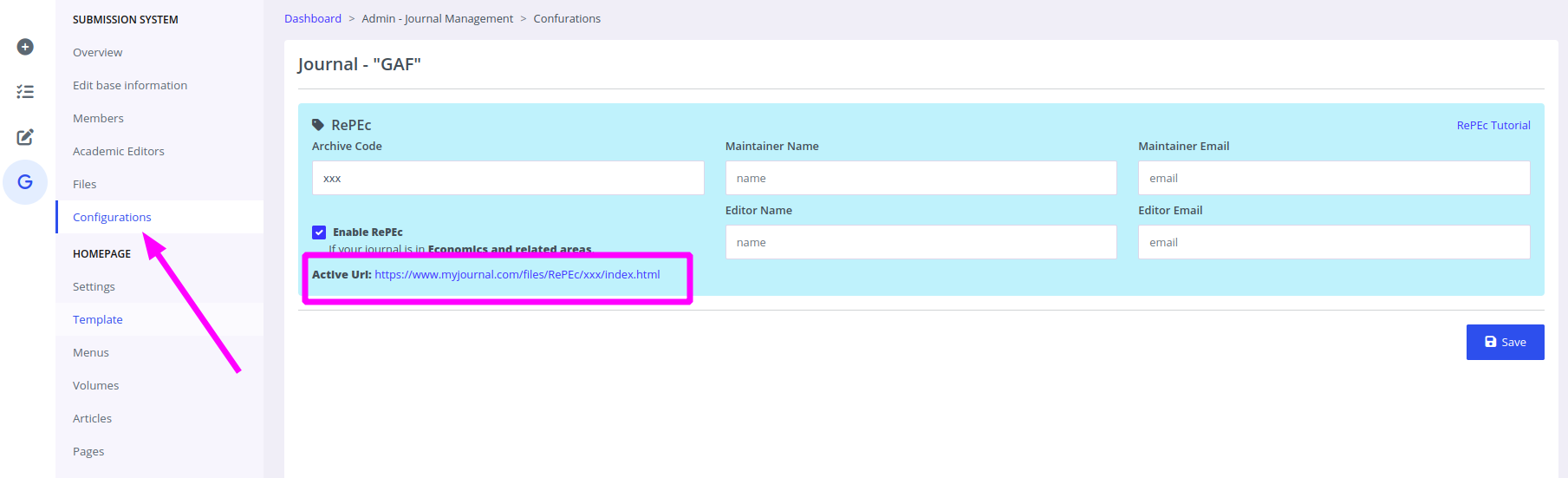
Figure 3: Configuring RePEc details within the PaaS environment
Academic Stack will display the generated Active URL. Copy this URL and use it when configuring your RePEc archive. The URL normally follows this pattern:
https://www.yourjournal.com/files/RePEc/{archive_code}/index.html
Configure the Archive URL in RePEc
After Academic Stack generates the Active URL, submit or update the archive URL in RePEc according to the RePEc archive instructions.
The Active URL is the public entry point that RePEc uses to discover the archive metadata generated by Academic Stack. Before submitting it to RePEc, open the Active URL in your browser and confirm that the displayed metadata is complete and correct.
If the archive code changes, or if the journal domain changes, you must update the URL in RePEc as well.
Maintenance Tips
After enabling RePEc, ensure you maintain the following:
- Keep article metadata complete and consistent.
- Open the Active URL after configuration changes and verify that the metadata output is correct.
- Make sure article pages remain publicly accessible.
- Keep maintainer and editor emails up to date.
- Do not change the archive code unless RePEc has instructed you to do so.
- If the website domain changes, immediately update the RePEc archive URL.