Sections & Special Issues
In Academic Stack, Sections and Special Issues utilize the same robust front-end page structure and configuration options. Both are designed to organize journal content, present curated article collections, and provide dedicated landing pages for readers.
While Sections and Special Issues share the same underlying presentation layer, they serve distinct editorial purposes. A Section is a permanent category within a journal, whereas a Special Issue is a temporary, theme-focused collection of manuscripts.
The relationship within the publishing hierarchy is structured as follows:
Journal
  ↳ Section (Permanent)
    ↳ Special Issue (Thematic Collection, Optional)
      ↳ Published Articles
Articles remain standard journal articles. Section and special issue pages simply provide additional ways to browse, filter, and present them without altering their core metadata.
Explore live examples of these pages on our demo site:
- Sections list page: Global Journal of Earth and Atmospheric Sciences - Sections
- Special Issues list page: Global Journal of Earth and Atmospheric Sciences - Special Issues
Sections vs. Special Issues
To help you decide which configuration to use, see the side-by-side comparison below:
| Feature | Sections | Special Issues |
|---|---|---|
| Editorial Purpose | Permanent subject area, article type, or category. | Focused thematic collection, call-for-papers, or guest-edited topic. |
| Lifespan | Stable, permanent part of the journal. | Limited submission period, remains online as a permanent archive. |
| Submissions | Always open (unless manually retired). | Has specific start and deadline dates. |
| Academic Oversight | Managed by Section Editors. | Led by Guest Editors (Special Issue Editors). |
| Hierarchy | Sits directly under the Journal. | Can be standalone or linked to a parent Section. |
Configuration Fields Reference
Although both options share similar configuration settings, they have distinct fields tailored to their respective roles in the journal hierarchy.
Section Fields
A section represents a permanent category or subject area. Its configuration includes:
- Name: The public-facing name of the section (e.g., "Review Articles", "Atmospheric Chemistry").
- Slug: A unique URL identifier (e.g.,
review-articles) used to construct the section's landing page link. - Short Description: A brief summary shown on index and list pages.
- Content: The full introductory content or description of the section.
- Keywords: Searchable metadata tags used for content classification and discovery.
- Status: Defines whether the section is Open or Closed for new manuscript submissions.
- Weight: Numeric value determining the display priority in management list and public menus.
- Design Settings: Custom banner image, background style, colors, and layout widgets.
- View Count: Public analytics tracking page visits.
When a Section is marked as Closed, its landing page remains public so readers can browse previously published articles, but it is hidden from the submission form to prevent new manuscripts from being submitted to it.
Special Issue Fields
A special issue is a temporary thematic collection. Its configuration includes:
- Title: The public-facing title of the special issue (e.g., "Advances in Climate Modeling").
- Linked Section: An optional link associating the special issue with a parent Journal Section.
- Short Description: A concise summary shown on listing cards and index pages.
- Information / Scope: The detailed Call-for-Papers (CFP) and scope description.
- Keywords: Descriptive terms used to highlight the issue's theme and improve searchability.
- Submission Open Date: The calendar date when the special issue begins accepting manuscripts.
- Submission Deadline: The final date for authors to submit to the special issue.
- Status: The workflow state of the special issue (e.g., Draft, Published, or Archived).
- Weight: Sort order weight for public listings.
- Design Settings: Custom banner, theme colors, background image, and sidebar widgets.
- View Count: Public analytics tracking page visits.
- Published Articles: A list of articles formally assigned to this special issue collection.
Academic Editors
Sections and special issues support assigned academic editors to manage peer review and guest curation.
When adding an academic editor, Academic Stack searches the system-wide editor database by email:
- Existing Editor: Automatically pre-fills their details and links their profile, maintaining consistency with the journal editorial board.
- New Editor: Prompts the editorial office to create a new profile during assignment.
This central repository maintains consistent profiles across:
- Journal Editorial Board members
- Section Editors
- Special Issue Guest Editors
- Reviewers and manuscript assignees
If an editor requires a specific affiliation or biography for a particular special issue or section, publishers can use Override Fields on the editor-relationship model. This displays custom Affiliation or Biography info on the collection page while keeping their main profile unchanged.
Article Assignment and Editorial Routing
When submitting or processing manuscripts, articles can be linked to a section and/or special issue. This link handles both public classification and backend editorial routing.
1. Submission Selection
During submission, the form includes dropdown selectors for:
- Section
- Special Issue
The special issue list is automatically filtered by journal, status, and submission dates to prevent submissions to inactive or closed calls.
2. Editorial Recommendations and Routing
When inviting an academic editor for editorial pre-check or the final decision, Academic Stack prioritizes recommendations based on the target collection:
Special Issue Editors (First Priority)
  ↳ Section Editors (Second Priority)
    ↳ Journal Editors (Fallback Pool)
- Special Issue Match: If the article is submitted to a special issue, the guest editors of that special issue are recommended first.
- Section Match: If the article belongs to a section, the section's assigned editors are recommended.
- General Fallback: Journal editorial board members are recommended if no collection-specific editors are found or available.
This automated routing directs manuscripts to editors with the exact academic expertise needed, while leaving the editorial office the flexibility to assign any qualified editor.
Public List Page
The list page provides a clear directory of all active and past collections, including status filters, submission deadlines, and article counts.
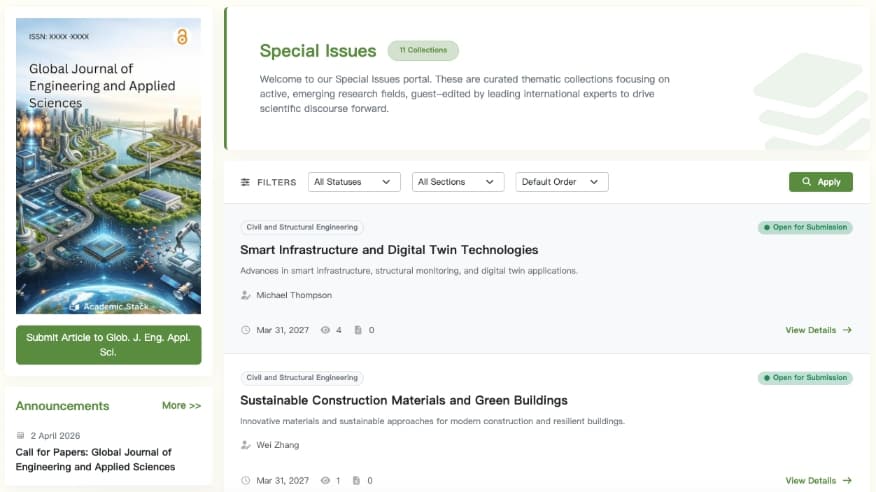
Public Special Issue & Section List Page with status filters and active submission countdowns.
Detail Page
The detail page serves as the public landing page for a specific section or special issue, showcasing its scope, guest editors, and list of published papers.

Detailed landing page presenting the Call-for-Papers, Guest Editor bios, and a chronological listing of accepted papers.
Custom Page Design
Publishers can configure a custom theme, banner, background image, and custom sidebar widgets to highlight a specific collection.
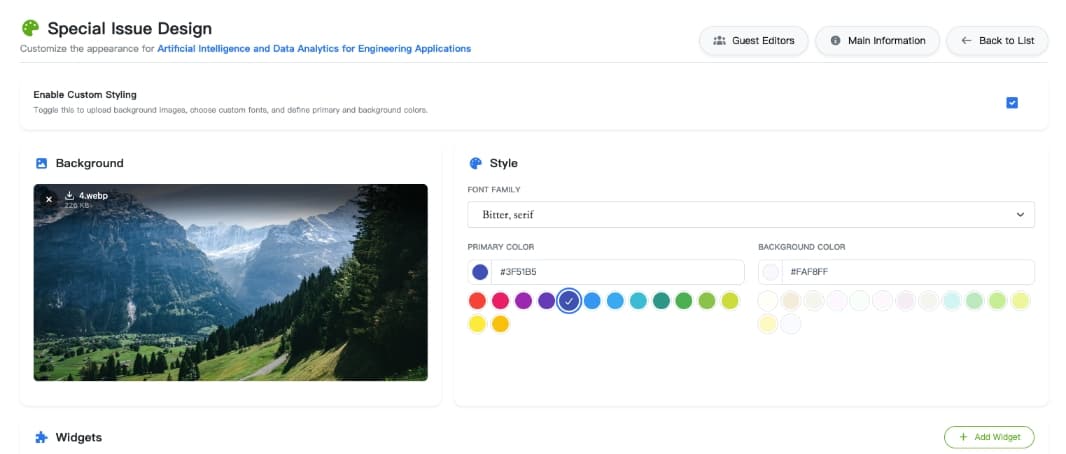
Visual design editor for customizing banners, colors, and landing page layouts.
If custom design settings are not defined, the page falls back to the journal's default website stylesheet. This keeps management low-effort for standard sections while enabling rich branding for high-profile special issues.
Recommended Workflow
To manage sections and special issues efficiently, we recommend the following process:
Set up Journal Sections (Permanent Categories)
  ↳ Define Section Editors and configure default styling
    ↳ Create a Special Issue (under a Section or standalone)
      ↳ Assign Guest Editors & set Submission Deadlines
        ↳ Design the Special Issue page (Banner & custom styles)
          ↳ Authors submit manuscripts to the Special Issue
            ↳ Automated routing to Guest/Section Editors for review
              ↳ Publish accepted articles directly into the Special Issue