Overview
Academic Stack is a comprehensive journal management solution, distinct from systems that only offer submission and review processes. Academic Stack provides users with a seamlessly designed journal homepage publication service, enabling you to effortlessly own a professional OA journal homepage.
You can follow the guidance on Academic Stack Builder to establish and publish your journal, obtaining an exquisite journal homepage. Academic Stack assigns a fallback domain based on the journal Slug provided by the user, with a format like myjournal.journal.academicstack.com. How to use Academic Stack Builder?.
Next, you can bind your independent domain (assuming your journal domain is myjournal.com) and enjoy the SSL security certificate provided by Academic Stack. How to bind a domain?.
Example Image - 1: https://www.anserpress.org/journal/jea

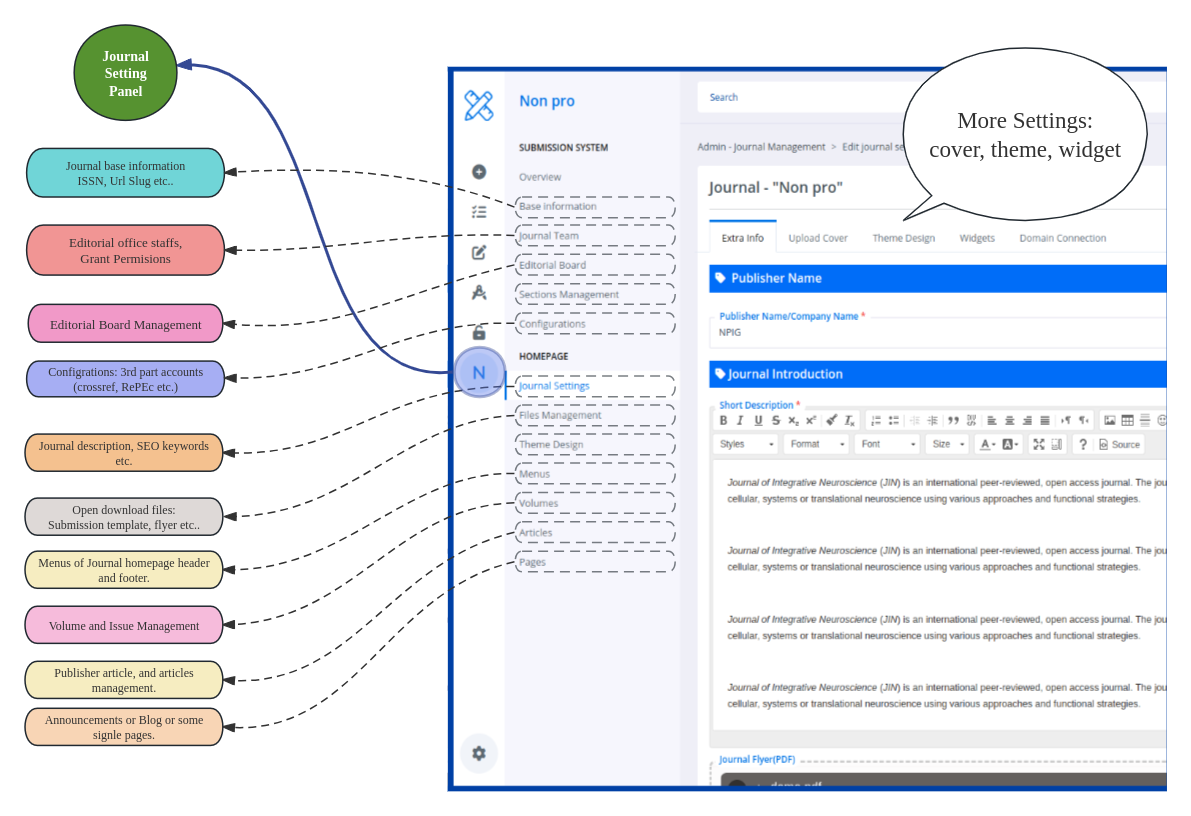
Subsequently, you can log in to your journal homepage and access the control panel for journal settings, such as https://www.myjournal.com/my-academic-stack/overview.
- Modify information, select templates, and design styles.
- Customize menus.
- Publish new articles.
- Add webpage widgets.
- ...
Example Image - 2:
With the Academic Stack system, you will have a comprehensive and flexible journal management tool, turning your journal homepage into not just a showcase platform but also an interactive and professional window.